
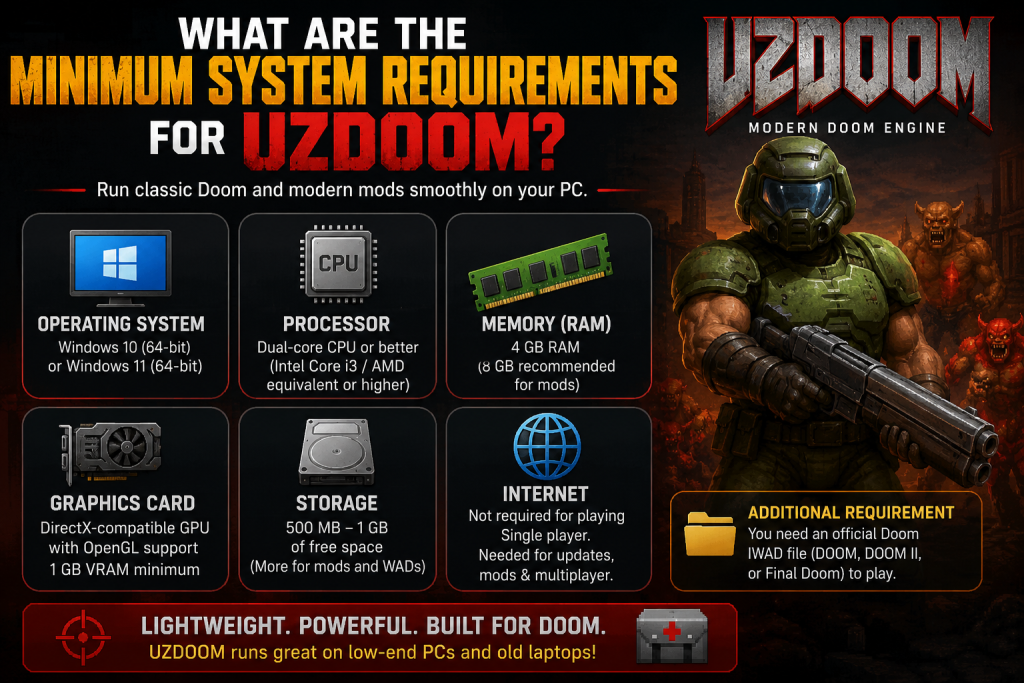
If you’re planning to play the classic Doom games using UZDoom, one of the first questions you may have is: What are the minimum system requirements for UZDoom? Fortunately, UZDoom is designed to be lightweight and accessible, making it an excellent choice for both older and modern PCs. Whether you want to experience the original Doom campaigns or enjoy thousands of custom WAD files and mods, having the right hardware ensures smooth gameplay and stable performance.
In this guide, we’ll cover the minimum and recommended system requirements for UZDoom, explain how different hardware components affect performance, and share tips for getting the best experience. By the end, you’ll know whether your computer is ready to run UZDoom without any issues.
Read More: Does UZDoom Support Custom WAD Files and Doom Mods?
What Is UZDoom?
UZDoom is a modern Doom source port that enhances the original Doom engine with improved graphics, better hardware compatibility, higher screen resolutions, advanced scripting support, customizable controls, and compatibility with thousands of community-created mods. Instead of replacing the classic gameplay, UZDoom modernizes it while preserving the fast-paced action that made Doom famous.
Unlike the original DOS releases, UZDoom is designed for modern versions of Windows and takes advantage of newer graphics technologies while still maintaining excellent performance on modest hardware.
Minimum System Requirements for UZDoom
If you’re planning to install UZDoom for the first time, these are the basic system requirements you should meet.
Operating System
UZDoom works best on modern versions of Windows.
Minimum supported systems typically include:
- Windows 10 (64-bit)
- Windows 11 (64-bit)
Some older versions may work depending on the build, but Windows 10 or later is recommended for the best compatibility.
Processor Requirements
UZDoom does not require a powerful processor.
A basic dual-core CPU is generally sufficient, such as:
- Intel Core i3
- AMD Ryzen 3
- Equivalent dual-core processor
Even processors released several years ago can usually handle the game without performance issues.
Memory (RAM)
The minimum RAM requirement is relatively small.
Recommended minimum:
- 4 GB RAM
For larger mods or high-resolution texture packs, having 8 GB or more provides additional stability and smoother performance.
Graphics Card Requirements
One of the advantages of UZDoom is that it does not demand a high-end graphics card.
Minimum GPU:
- DirectX-compatible graphics card
- OpenGL support
- 1 GB VRAM
Integrated graphics from Intel, AMD, or newer laptops are generally capable of running the game comfortably.
If you plan to use advanced visual mods, dynamic lighting, or HD texture packs, a dedicated graphics card will provide better performance.
Storage Space Needed
UZDoom itself is relatively small.
You’ll generally need:
- Around 500 MB to 1 GB of free storage
However, if you install multiple WAD files, texture packs, sound replacements, and gameplay mods, the total storage requirement can increase significantly.
Display Requirements
UZDoom supports a wide range of display resolutions.
Common supported resolutions include:
- 1280×720
- 1920×1080
- 2560×1440
- 4K displays
Unlike the original Doom, which was limited to low resolutions, UZDoom supports widescreen monitors and modern display technologies.
Internet Connection
An internet connection is not required to play the game itself.
However, you’ll need internet access if you want to:
- Download updates
- Install community mods
- Access multiplayer servers
- Download custom WAD files
Once everything is installed, single-player gameplay works completely offline.
Additional Requirements
To play UZDoom, you’ll also need an official Doom game data file (IWAD)
Such as:
- DOOM
- DOOM II
- Final Doom
These files contain the original game assets that UZDoom uses to launch the game.
Without an IWAD, UZDoom cannot run the original campaigns.
Can Older PCs Run UZDoom?
Yes. One of the biggest strengths of UZDoom is its excellent optimization.
Many computers that are more than ten years old can still run the game at full speed, especially if you’re playing the original campaigns without heavy graphical modifications.
Older laptops with integrated graphics are often capable of delivering smooth gameplay at 1080p.
Do Mods Increase Hardware Requirements?
Yes, depending on the type of mod you install.
Simple gameplay mods usually have almost no impact on performance.
However, advanced modifications featuring:
- High-resolution textures
- Dynamic lighting
- Particle effects
- Complex scripting
- Large maps
can increase CPU, GPU, and RAM usage considerably.
If you’re planning to play heavily modded Doom experiences, upgrading to a modern quad-core processor and a dedicated graphics card is recommended.
Recommended Specifications for the Best Experience
Although UZDoom runs well on basic hardware, these specifications provide a smoother experience with modern mods:
- Windows 11 (64-bit)
- Intel Core i5 or AMD Ryzen 5
- 8–16 GB RAM
- Dedicated graphics card with 2 GB or more VRAM
- SSD storage
- Full HD or higher monitor
These specifications allow most community projects and graphical enhancements to run without noticeable slowdowns.
Performance Tips
If your computer struggles to maintain smooth performance, you can improve gameplay by:
- Lowering the screen resolution
- Disabling advanced lighting effects
- Reducing texture quality
- Turning off unnecessary visual enhancements
- Closing background applications
- Using simpler gameplay mods instead of graphics-heavy packages
These adjustments can significantly improve frame rates on older hardware.
Is UZDoom Suitable for Low-End PCs?
Absolutely.
Compared to modern games that require powerful graphics cards and large amounts of memory, UZDoom remains extremely lightweight. Most computers manufactured within the last decade can run it comfortably.
Its flexible settings allow players to balance graphics quality and performance according to their hardware capabilities, making it an excellent choice for both retro gaming enthusiasts and newcomers.
Conclusion
UZDoom is an excellent choice for anyone looking to enjoy classic Doom with modern enhancements, and the best part is that it doesn’t require powerful hardware to run smoothly. A basic dual-core processor, 4 GB of RAM, and a DirectX-compatible graphics card are enough for most players to experience the game without issues. If you plan to use high-resolution texture packs or advanced mods, upgrading your hardware can provide even better performance. Overall, UZDoom remains one of the most accessible Doom source ports available, offering impressive compatibility, customization, and smooth gameplay across a wide range of PCs. Before installing, simply verify that your system meets the minimum requirements to ensure the best possible gaming experience.